Here are the slides:
2-Using-GRAMPS-for-your-genealogy-project.odp (OpenOffice format)
2-Using-GRAMPS-for-your-genealogy-project.pdf (PDF)
They are available under the Creative Commons' Attribution-ShareAlike 2.0 Generic (CC BY-SA 2.0)

raspi-config which is run the first time it starts up. sudo apt-get install mysql-server ssh raspberrypi.local' or browse tohttp://raspberrypi.local/sudo apt-get install avahi-utils sudo apt-get install emacs23-nox screenssh pi@raspberrypi.local
sudo -i wget http://download.opensuse.org/repositories/isv:ownCloud:community/Debian_6.0/Release.key
apt-key add - < Release.key
echo 'deb http://download.opensuse.org/repositories/isv:ownCloud:community/Debian_6.0/ /' >> /etc/apt/sources.list.d/owncloud.list
apt-get update
apt-get install owncloudowncloud and database host localhost. It may take a couple minutes to be complete, so be patient.cd /var/www/wget -c https://github.com/gothfox/Tiny-Tiny-RSS/archive/1.7.4.tar.gztar zxvf 1.7.4.tar.gz
mv Tiny-Tiny-RSS-1.7.4 tt-rsschown -R www-data:www-data tt-rssmysql -u root create database ttrss;quit cd tt-rss/schema
mysql -u root ttrss < ttrss_schema_mysql.sql cd /var/www/tt-rss
cp config.php-dist config.phpemacs config.php (or use vi, nano, etc)
        define('DB_TYPE', "mysql");
        define('DB_HOST', "localhost");
        define('DB_USER', "root");
        define('DB_NAME', "ttrss");
        define('DB_PASS', "");

        define('SELF_URL_PATH', 'http://raspberrypi.local/tt-rss/');
define('SINGLE_USER_MODE', true); apt-get install php5-curl
cd /var/www
wget -c http://thinkupapp.com/download/
mv index.html thinkup-1.3.1.zip
unzip thinkup-1.3.1
chown -R www-data:www-data thinkuplocalhostthinkuproot# mysql -u root thinkupselect id,full_name,is_activated from tu_owners;update tu_owners set is_activated=1 where id=1;
mencoder -nosound -ovc lavc -lavcopts vcodec=mjpeg -o timelapse-10fps.avi -mf type=jpeg:fps=10 mf://*.JPGghb aka the very handy Handbrake tool.
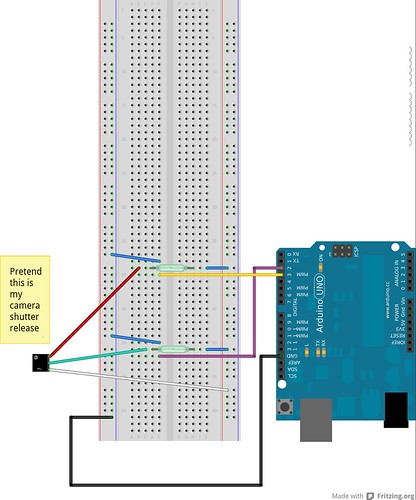
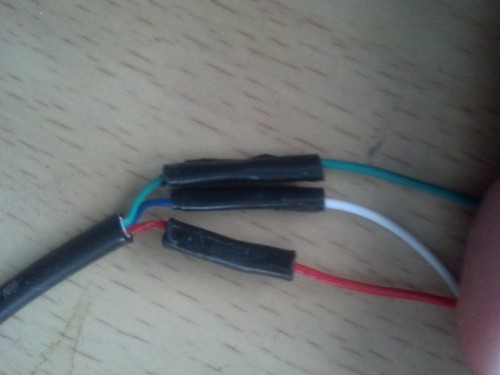
/*
 * A better camera control for a Sony A-100 DSLR
 * marc@nozell.com
 */

// Pin 13 has an LED connected on most Arduino boards.
// give it a name:
int led = 13;
int relayA = 2;
int relayB = 3;

// the setup routine runs once when you press reset:
void setup() {

  Serial.begin(9600);

  if (Serial.available() )
    Serial.println("-- Starting ---");

  // initialize the digital pin as an output.
  pinMode(led, OUTPUT);
  pinMode(relayA, OUTPUT);
  pinMode(relayB, OUTPUT);

}

// the loop routine runs over and over again forever:
void loop() {

  Serial.println("-- Focusing ---");

  // first focus -- short white & green

  digitalWrite(relayA, HIGH);
  delay(2000);               // 2 sec
  digitalWrite(relayA, LOW);
  delay(1000);               // 1 sec


  Serial.println("-- Take Photo ---");

  // then take a photo -- short white, green & red

  digitalWrite(relayA, HIGH);
  digitalWrite(relayB, HIGH);
  delay(1000);               // 1 sec
  digitalWrite(relayA, LOW);
  digitalWrite(relayB, LOW);

  Serial.println("-- Sleep for 30s ---");
  delay(23000);  // 2 + 1 + 1 + 3 + 23

  for (int i = 0; i < 3; i++) { // 3seconds
    digitalWrite(led, HIGH);
    delay(500);
    digitalWrite(led, LOW);
    delay(500);
    Serial.print(".");
  }
  Serial.println("!");
}
mencoder -nosound -ovc lavc -lavcopts vcodec=mjpeg -o timelapse-30fps.avi -mf type=jpeg:fps=30 mf://*.JPG
$ sudo -i
[sudo] password for marc:
# apt-get install apache2 php5 php5-gd php-xml-parser \
      php5-intl php5-sqlite php5-mysql smbclient curl \
      libcurl3 php5-curl
...a bunch of packages installed...
# cd /var/www/
# tar jxf ~marc/owncloud-4.5.5.tar.bz2
# chown -R www-data:www-data owncloud/apps
# chown -R www-data:www-data owncloud/config
# mkdir /mnt/owncloud-data
# chown www-data:www-data /mnt/owncloud-data
# ln -s /mnt/owncloud-data/ /var/www/owncloud/data
/var/www/owncloud/data